QuoteWerks has many pre-defined quote, order, purchase order, sales order, and invoice print templates to be used when printing. These print templates can be customized using the visual layout designer. Additionally, the printing engine creates a PDF file that is previewed, printed, emailed, etc within QuoteWerks and numbers the pages individually.
To print a document, open the document, and then select the File -> Print/E-mail/Deliver menu, or click on the  icon on the icon toolbar to display the Print, Share, Publish, Deliver Document window.
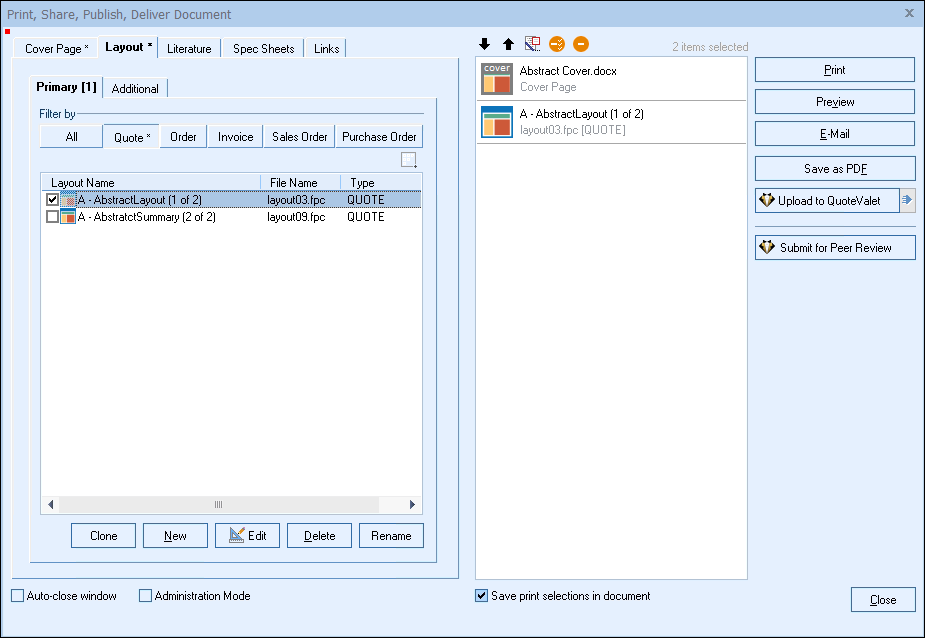
The Print, Share, Publish, Deliver Document window includes five tabs, which are outlined in the following sub-topics:
From here, you can choose to:
•Send the document via QuoteValet
•Submit the document for peer review
•Set Access Rights for Cover Pages, Layouts, and Literature files
See also:
•Cover Page, Literature, and Microsoft Word Template Document Macros
•Previewing, Printing, Faxing, and E-mailing a Document
•Assembling the Document as a PDF File
