Sales Tax Rates
QuoteWerks offers a variety of ways to meet your company's sales tax needs ranging from simply entering an aggregate sales tax rate to retrieving an aggregate sales tax rate from your CRM to automated aggregate sales tax rate lookup based on the Zip+4 of the shipping address.
QuoteWerks can handle sales tax and value-added taxes from around the world. This includes the UK VAT, Canadian PST, GST, and harmonized taxes, and others. All of the methods below can be used world-wide except for the Automatic Sales Tax Rates which are limited to US Addresses.
Sales Tax Rate Overview
Did you know that there are more than 40,000 Sales Tax jurisdictions in the United States?
Generally speaking, the state will have a sales tax rate that applies to all areas in the state and the county will add the additional sales tax rate and then sometimes the city will add their own sales tax rate. All of these sales tax rates added together result in the total aggregate sales tax rate.
Since your total tax rate depends on the combination of the State, County, and City you are located, businesses in the same 5-digit zip code could have a different sales tax rate because the area covered by a zip code can actually include more than one city which is why the Zip+4 postal code is required for accurate sales tax rate lookup.
QuoteWerks offers a variety of ways to handle all of this complexity.
-
 Sales Tax Rate Options In QuoteWerksA short overview of the different Sales Tax options available with QuoteWerks
 -
 Automatic Sales Tax RatesYour US addresses can automatically be fixed, and the sales tax rate can automatically be retrieved when the contact is retrieved from your CRM using the QuoteWerks Realtime module.
 -
 Sales Tax Rate from your CRMAuto-Retrieve Sales Tax Rates from your CRM using the QuoteWerks Datalink
 -
 Default and Manual Sales Tax RatesQuoteWerks Default Sales Tax and Selecting Tax Rates from a List
 -
 USA Advanced Sales Tax SystemQuoteWerks USA Advanced Sales Tax System for Different Tax Rates per Item Type (Service vs Product)
QuoteWerks Sales Tax Rate Options

Set a Default Sales Tax Rate
Many companies only sell and ship to local businesses where the sales tax rate does not change from order to order. For these companies, they can simply set a sales tax rate that all new quotes will default to.

Enter Sales Tax Rate Manually
If you don't have our realtime module with automatic sales tax rate lookup, you can setup a list of sales tax rates that are commonly used within your jurisdiction and select the appropriate rate when you initially create the quote. Often customers just lookup tax rates for free online.

Obtain Tax Rate from your CRM
Using the QuoteWerks Datalink feature, you can retrieve the sales tax rate for the selected customer from a field in your CRM solution. This is a great solution if you already maintain your tax rates in your CRM or PSA - enabling you to only have to manage the rates in one location.

Automatic Sales Tax Rates (USA only)
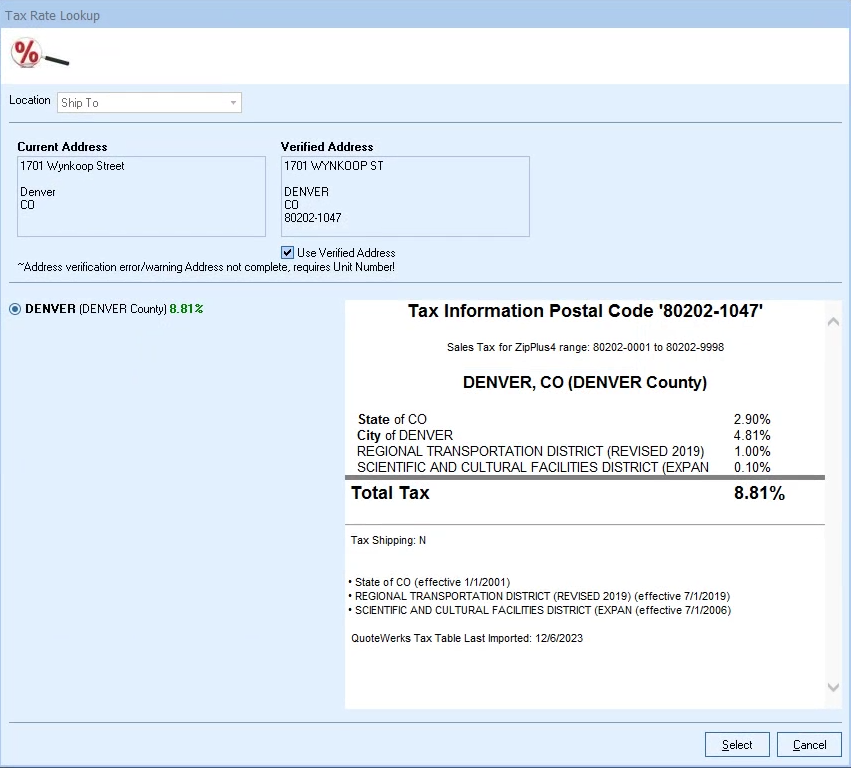
Using our sales tax rate lookup service included with our Realtime Module, QuoteWerks can automatically lookup the appropriate sales tax rate for your shipping location using the Zip+4 postal code. This feature automatically verifies your shipping address determining what the Zip+4 postal code is.
If your state has different tax rates or if you sell to other states, this will be the most efficient for you.
Automatic Sales Tax Rates

Auto Address Fix and Realtime Sales Tax Retrieval
Your US addresses can automatically be fixed, and the sales tax rate can automatically be retrieved when the contact is retrieved from your CRM using the QuoteWerks Realtime module. You no longer need to remember to re-select and search for the correct Sales Tax Rate.

Zip+4 Based Sales Tax Rates
Do all of your addresses in your CRM have the Zip code +4 digits (also known as the 9-digit zip code)? In most cases, they do not. This is required to retrieve the most accurate Sales Tax information for the address you are quoting. QuoteWerks can now do this for you. There is no need to select from a list of tax rates because now you will have the tax rate for that specific address rather than just the 5-digit postal code.

Address Verification
Do you manually type Addresses into QuoteWerks? Are the Addresses in your CRM always accurate? Have you ever forgotten to include a Suite number? With the Address Verification feature, these issues are in the past. Addresses will be more accurate and with all of the required shipping details before creating the new contact in your CRM, sending the quote to the customer, or your tech tries to arrive onsite.
It is very important to have access to current tax rate information. How much time do you spend verifying the specific tax rate for the county next to yours or even the postal code down the street? With the built-in tax rate lookup, all you have to do is press a button.
Frequently Asked Questions
What is the Monthly or Annual Fee for the service?
While there is no Monthly or Annual Fee for this Tax Rate Lookup service, current maintenance is required. The Tax Rate
Lookup service is included with the Real-time Data
module.
What States are included with the service?
All 50 states with their postal codes are included.
What tax rate information is available?
The State, County, City, and other tax rate Jurisdictions are included. If there is
a special tax added for a transportation or cultural district, you will be able
to see it.
How often are the tax rates updated and how are they installed in each
QuoteWerks installation?
The tax rates are updated monthly on our servers so you do not need to do
anything other than to click on the Lookup Tax Rate button within QuoteWerks to
receive the updated rates.
How does this service compliment the tax rate information in my CRM/PSA?
The QuoteWerks tax rate lookup service compliments the tax rate information
retrieved from your CRM/PSA application like ConnectWise and Autotask by verifying that the
tax rate information in your CRM/PSA is up to date and also enables you to see
the tax rate break downs.
Using the QuoteWerks Datalink feature, you can also auto-retreive the tax rate from your CRM or PSA like ConnectWise PSA and Autotask when you retrieve the contact.

USA Advanced Sales Tax System
QuoteWerks' USA Advanced Sales Tax System goes beyond a single aggregate sales tax rate, providing line-item-level sales tax calculations across multiple tax jurisdictions, including State, County, and City.
This is especially useful when different products and services are taxed differently or when your business operates in states with more complex sales tax requirements. This functionality is available with the Realtime Module and current UMP.
Advanced Line-Item Sales Tax Calculations
Each line item on a QuoteWerks document can follow its own sales tax rules. Products and services can be assigned to different tax categories, with support for special tax rules, rate overrides, and additional taxes when needed.
QuoteWerks calculates the applicable taxes for each item based on the customer's Ship To location and the tax rules configured for that type of item.
Single Article Sales Tax Limits
QuoteWerks supports Single Article sales tax limits for the six U.S. states that require them:
- Alaska (AK)
- Arkansas (AR)
- Arizona (AZ)
- Florida (FL)
- Idaho (ID)
- Tennessee (TN)
This enables QuoteWerks to properly calculate taxes when a jurisdiction limits the amount of an individual item's price that is subject to a particular tax.
Complete Tax Visibility
The Item Tax Summary column provides a clear breakdown of the taxes calculated for each line item directly within the quote.
For even greater detail, the Tax Details window provides visibility into the jurisdictions, rates, rules, and calculations used to determine the sales tax on the document.
The tax information used for a quote is stored with the document, helping preserve the original tax calculation rather than automatically recalculating older quotes when tax rates or rules change.

Third Party Tax Rates
While the QuoteWerks USA Advanced Sales Tax System provides advanced line-item tax calculations, multiple tax jurisdictions, Single Article limits, and detailed tax visibility, some organizations require additional tax compliance capabilities beyond tax calculation.
If you need these advanced features at this time, we recommend you use a third party integration that integrate providers like Avalara.
Third Party Tax Rates
Is there an integration with Avalara Avatax?
Through a third-party developer, there is an Avalara Avatax integration to QuoteWerks. Learn more about their integration here.